
Ambient gradient backdrop

Automate file imports from
HRIS

FileFeed automates how your business exchanges files - connecting SFTP, email, and web uploads into one automated pipeline for validation, transformation, and API delivery.

FileFeed dashboard interface

Integrates seamlessly with

WorkdayBambooHRSAPNetSuiteSalesforceHubSpotShopifyBigCommerce

Our Platform

Support manual and recurring File imports

Give customers an experience that feels native to your product while your team keeps full control over data validation, transformations, and automation.

Free
Forever

Manual

Embeddable Importer

import { FilefeedProvider, FilefeedSheet } from "@filefeed/react"
export default function FileFeedImporter() {
return (
<FilefeedProvider>
  <FilefeedSheet config= {contactsSheet} />
  </FilefeedProvider>
)
}

Upload a file

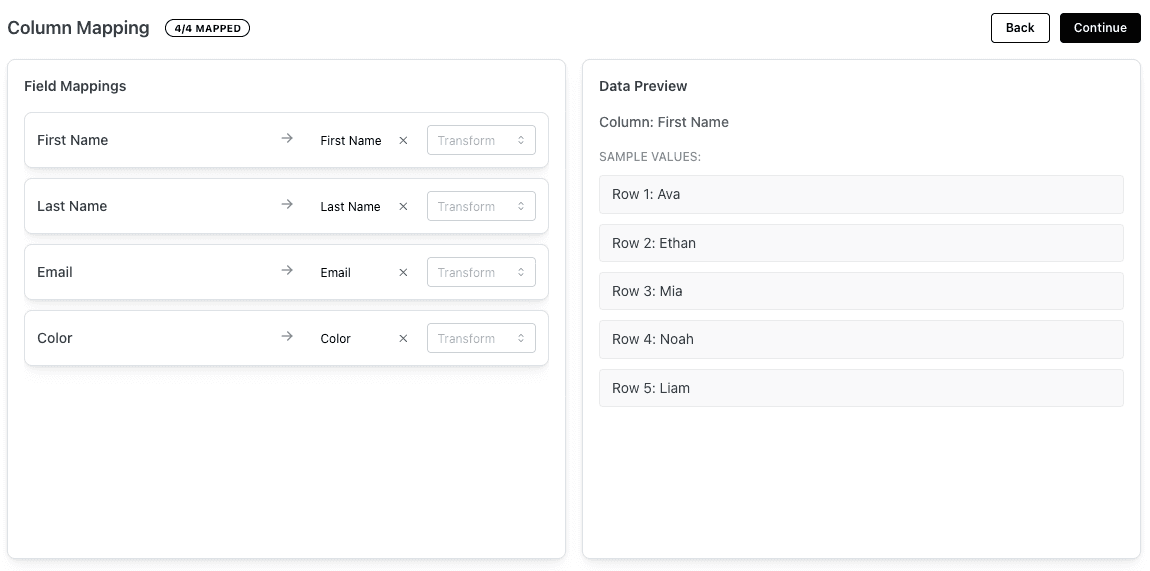
Add a complete CSV/XLSX importer to your app with one line of code. No need to build mapping, validation, or transformation UIs-FileFeed does the hard work for you.

Recurring

Automated FileFeeds

JSON

UKG export.json

{"firstName":"John"}

CSV

ADP legacy.csv

EMP_FIRST,EMP_LAST,EMAIL_ADDR,DEPT_CODE

CSV

Workday export.csv

FirstName,LastName,WorkEmail,Department

CSV

iCIMS employees.csv

"First Name","Last Name","Email Address","Department Name"

CSV

Greenhouse data.csv

first_name,last_name,email,department

FileFeed Standardization Engine

Validates structure, maps fields from any source and normalizes every record.

Detect
Schema
Map
Fields
Normalize
Data
Deliver
API

Field Mapping

FirstName / First Name / EMP_FIRST
first_name
LastName / Last Name / EMP_LAST
last_name
WorkEmail / Email Address / EMAIL_ADDR
work_email
Department / Dept / DEPT_CODE
department

Normalization

"John "trim()"John"
"sales"capitalize()"Sales"

Standardized Employee Record

Unified output format

{
  "first_name": "John",
  "last_name": "Doe",
  "work_email": "john@company.com",
  "department": "Sales"
}

FileFeed automatically ingests, validates, maps, and normalizes data from any CSV or source — delivering one consistent schema to your API. No code, no maintenance.

How FileFeed Works

How FileFeed fits into your stack

Whether files come from SFTP, email, or an in-app importer, FileFeed sends every file through the same pipeline - validation, transformation, and delivery to your systems.

Source systems
FileFeed
Your app / warehouse

Ingest

Connect SFTP, email inboxes, or use the Importer in your app.

Validate & Transform

Apply schema checks, mapping rules, and normalizations.

Deliver

Consume ready-to-use data via REST API or webhooks.

Use Cases

Use cases we see most often

FileFeed standardizes the way teams ingest data from customers and partners across a range of industries and file formats.

HR & Payroll data

Import employee lists, payroll registers, and benefits data from HRIS and payroll tools.

E-commerce & orders

Standardize product catalogs, orders, and inventory feeds from merchants and marketplaces.

B2B SaaS customer onboarding

Let new customers bring their historical data via CSV/XLS without weeks of custom work.

Legacy & partner systems

Replace ad-hoc scripts and manual uploads with a stable, auditable file pipeline.

Why FileFeed

Why teams choose FileFeed

Built for modern product and engineering teams that need predictable, automated file flows without building everything from scratch.

Faster integrations

Launch file-based integrations in days instead of sprints of custom ETL scripts.

Less engineering overhead

One maintained pipeline instead of one-off jobs for each new customer or partner.

Secure by design

Encrypted storage, granular access control, and full audit trails for every file.

Built for developers

Open-source SDKs, clear REST API, and a predictable data model.

Built for product and engineering teams.

Product teams use FileFeed to unblock onboarding and new integrations.

Engineering teams use it to standardize file flows, reduce support tickets, and avoid owning brittle one-off scripts.

Schedule

Ready to automate your file workflows?

Tell us how you exchange files today, and we’ll show you how to replace manual uploads and scripts with a single, automated pipeline.